 Pair
PairLaunch a coin
Configure the coin and its pairing before signing a transaction through the official Pons factory.
Prepare your coin
Use a name people can recognise and a short alphanumeric ticker. Add a square PNG, JPEG or WebP under 4 MB. Pair crops the image to a square and stores a compressed copy at a content-addressed URL. A description, website and X profile help people understand the coin.
Website links must use HTTPS. Check the artwork, ticker and links carefully before signing; the launch transaction is not a reversible draft.
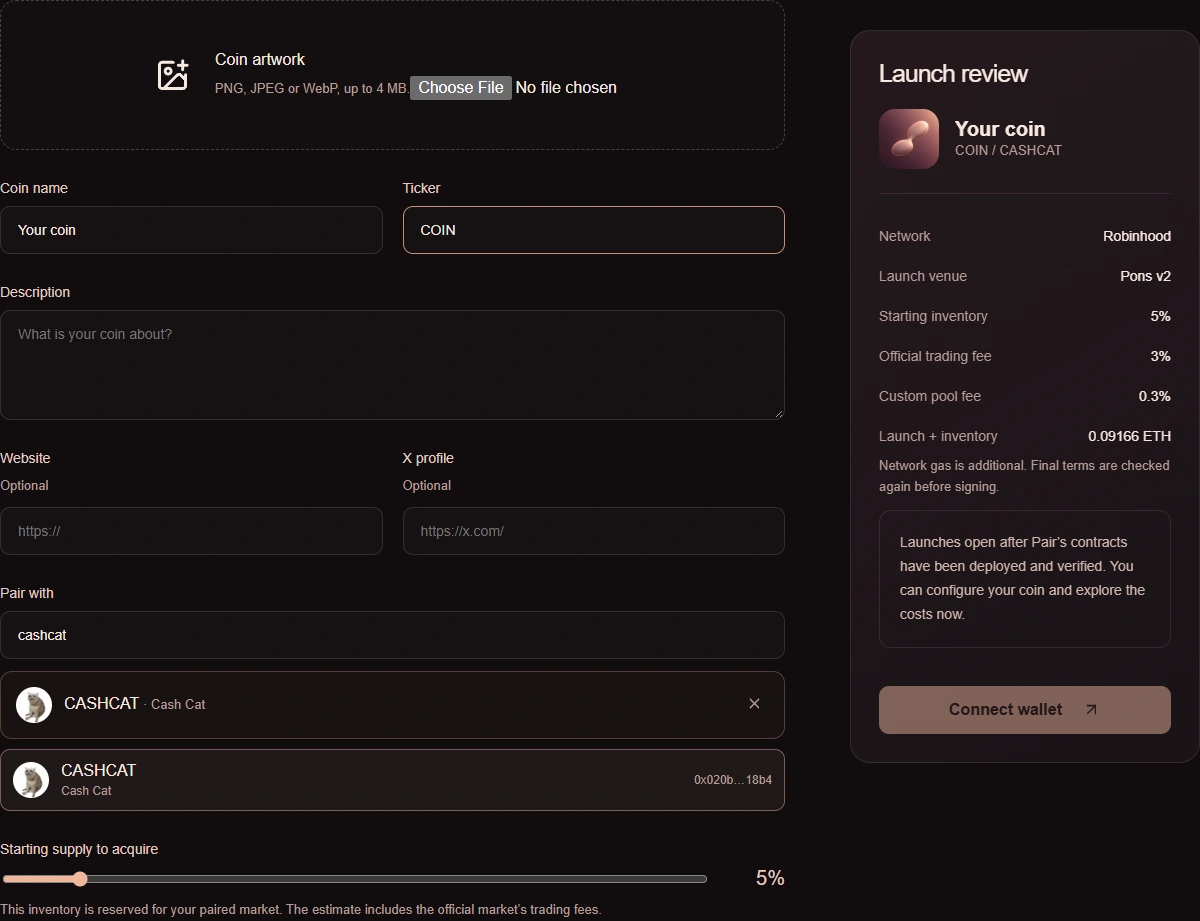
Choose the asset and starting inventory
Search for an asset or paste its contract address. Names and tickers are not unique, so compare the address with the asset’s official source. Pair reads the token contract to check its basic ERC-20 interface.
Select the percentage of supply to acquire on the official curve. The acquired tokens belong to the launch vault and are reserved for liquidity. They are not a personal allocation sent to the creator. A zero-percent launch is allowed, but the secondary pool has no tradable liquidity until it receives funding.
Review and sign
Pair reads the current Pons economics and simulates the launch from your connected wallet. The review includes the official fee, opening purchase, selected quote asset and transaction value. Network gas is additional.
The transaction pins the expected official economics and has a short expiry. If Pons changes relevant terms or the review expires, prepare it again. Never sign a transaction whose destination, value or network differs from the review.
Wait for confirmation
After your wallet submits the transaction, Pair records its hash and matches the destination, calldata, value and sender to your review. A successful receipt must also contain the expected Pair launch event.
Keep the transaction hash if you close the page. Do not launch again merely because a provider response was slow; check the existing transaction first.